🔑 Import S3 credentials
It is possible to programmatically import S3 credentials into S3Drive using JSON format.
Desktop example:
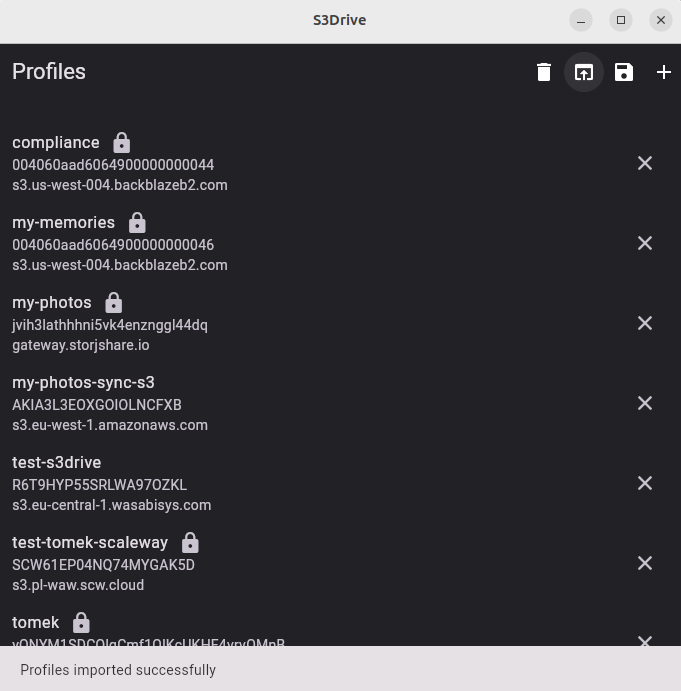
Unencrypted bucket
[
    {
        "bucketName": "bucket-movies",
        "keyId": "keyId",
        "applicationKey": "applicationKey",
        "endpoint": "https://s3.us-west-004.backblazeb2.com",
    },
]
Encrypted bucket
encryptionKey must be base64 encoded plaintext password.
For example if you wish to specify confidential as a password, this would translate into: Y29uZmlkZW50aWFs string.
Control filepath encryption using filepathEncryptionEnabled parameter.
[
    {
        "bucketName": "another-bucket",
        "keyId": "keyId",
        "applicationKey": "applicationKey",
        "endpoint": "https://s3.eu-west-1.amazonaws.com",
        "encryptionKey": "Y29uZmlkZW50aWFs",
    }
]
Multiple buckets
[
    {
        "bucketName": "bucket-movies",
        "keyId": "keyId",
        "applicationKey": "applicationKey",
        "endpoint": "https://s3.us-west-004.backblazeb2.com",
    },
    {
        "bucketName": "another-bucket",
        "keyId": "keyId",
        "applicationKey": "applicationKey",
        "endpoint": "https://s3.eu-west-1.amazonaws.com",
        "encryptionKey": "cG90YXRv",
    }
]
All available parameters
Required
bucketName
S3 bucket name.
- type:
string - example:
bucket-movies
keyId
Access key ID for your S3 provider.
- type:
string - example:
AKIAIOSFODNN7EXAMPLE
applicationKey
Secret access key for your S3 provider.
- type:
string - example:
wJalrXUtnFEMI/K7MDENG/bPxRfiCYEXAMPLEKEY
endpoint
S3-compatible endpoint URL.
- type:
string - example:
https://endpoint.com:9000
Optional
profileName
A human-readable name for this connection profile.
- type:
string - example:
My Backblaze Bucket
region
Region for the bucket.
- type:
string - default:
us-east-1
encryptionKey
Master encryption key as a base64-encoded plaintext password. Providing encryption key enables E2EE encryption in the root location.
- type:
string - example:
Y29uZmlkZW50aWFs
filepathEncryptionEnabled
Controls whether to enable filename and directory encryption. Effective only when encryptionKey is set.
- type:
boolean - example:
true | false - default:
true
v2CipherEnabled
Enables the V2 encryption cipher. Only enable if the remote was originally configured with V2. Effective only when encryptionKey is set.
- type:
boolean - example:
true | false - default:
false
storageClass
Controls the S3 provider-specific x-amz-storage-class header.
- type:
string - example:
ONEZONE_IA
Refer to the documentation of your S3 provider.
AWS
https://docs.aws.amazon.com/AmazonS3/latest/userguide/storage-class-intro.html#sc-compare
Options: STANDARD | REDUCED_REDUNDANCY | STANDARD_IA | ONEZONE_IA | INTELLIGENT_TIERING | GLACIER | DEEP_ARCHIVE | OUTPOSTS | GLACIER_IR | SNOW
Scaleway
https://www.scaleway.com/en/docs/storage/object/concepts/#storage-class
Options: Standard | One Zone - Infrequent Access | Glacier
autouploadPath
Directory path for automatic media backup on Android and iOS.
- type:
string - example:
Folder/PixelPhotos - default:
Automatic upload/<deviceName>
customDomain
Custom domain to use instead of the default endpoint for public URLs.
- type:
string - example:
cdn.example.com
includeBucketName
Whether to include the bucket name for unsigned share URLs. Works only when custom domain is set.
- type:
boolean - example:
true | false - default:
true
kmsEncryption
Enables AWS KMS server-side encryption.
- type:
boolean - example:
true | false - default:
false
supportVersioning
Whether the bucket supports object versioning.
- type:
boolean - example:
true | false - default:
true
md5VerificationEnabled
Enables MD5 checksum verification after upload.
- type:
boolean - example:
true | false - default:
false
multipartUploadEnabled
Enables multipart uploads for large files.
- type:
boolean - example:
true | false - default:
true
Default value is platform dependent - 5MB on web, 5MB on mobile, 10MB on desktop.
multipartConcurrentPartUploads
Number of parts to upload concurrently during a multipart upload.
- type:
integer - default:
5
multipartPartSize
Size in bytes of each part in a multipart upload.
- type:
integer - default:
5242880|10485760
Default value is platform dependent - 5MB on web, 5MB on mobile, 10MB on desktop.
multipartStartThreshold
File size threshold in bytes above which multipart upload is used instead of a single-part upload.
- type:
integer - example:
10485760 - default:
31457280|94371840|220200960
Default value is platform dependent - 30MB on web, 90MB on mobile, 210MB on desktop.
concurrentUploadTransfers
Number of file transfers to run concurrently.
- type:
integer - default:
4
headSkipSameFilesEnabled
Skips uploading a file if remote already has an identical version. Requires additional HEAD request.
- type:
boolean - example:
true | false - default:
true
crossDeviceSyncEnabled
Enables syncing state across multiple devices for the same bucket.
- type:
boolean - example:
true | false - default:
true
uploadTimeoutMsec
Upload timeout in milliseconds. Increase for slow connections or large files.
- type:
integer - default:
300000
downloadTimeoutMsec
Download timeout in milliseconds. Increase for slow connections or large files.
- type:
integer - default:
300000
thumbnailsGenerationEnabled
Enables thumbnail generation for media files.
- type:
boolean - example:
true | false - default:
true
On Web default is false due to performance reasons.
thumbnailRemoteSave
Whether to save generated thumbnails back to the remote.
- type:
boolean - example:
true | false - default:
true
nativeMount
Enables native filesystem mount for the bucket. Applicable to iOS and Android.
- type:
boolean - example:
true | false - default:
true
This setting might be overridden by the global setting. If mount is disabled globally, setting this value to true won't take precedence.
mountAutostart
Automatically starts the native mount when the app launches.
- type:
boolean - example:
true | false - default:
false
mountUseServerTime
Uses the server's reported time instead of the local clock for mounted files.
- type:
boolean - example:
true | false - default:
true
mountCustomPath
Custom local path for the native mount point.
- type:
string - example:
/mnt/my-bucket
forceUseRcloneUserAgentEnabled
Forces rclone to use native Rclone user agent string instead of app's default.
- type:
boolean - example:
true